How to Compile Effects
This tutorial explains how to compile effects and load them onto the OSCAR hardware platform.
Prerequisites
You must have the following installed and configured:
- Git and STM32CubeIDE.
- The Software_OSCAR_P01A01 repository cloned, with the workspace properly configured in STM32CubeIDE.
See: How to Create Your Workspace
Compiling Effects
- Open STM32CubeIDE and select the
OSCAR_Workspace. - We will now compile the Delay effect using a configuration compatible with the Loader.
- Select the
Software_OSCAR_P01_A01project. - In the toolbar, click the small downward arrow located next to the hammer icon (Build/Configure). This will open the list of build configurations.
- Click on
_Delay4Loaderin the list.
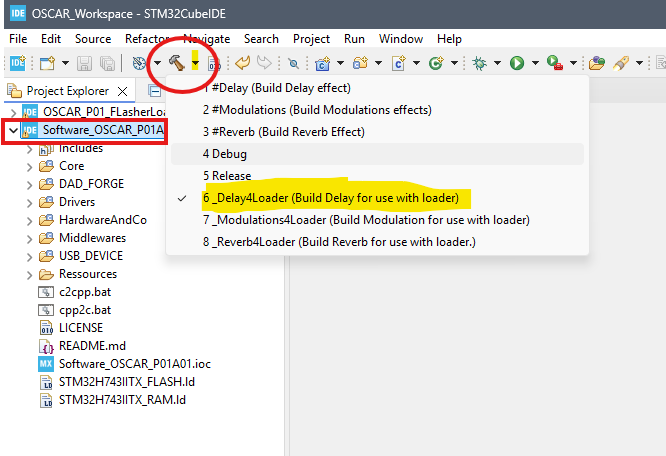
The Delay effect is now compiling.
- If the compilation completes successfully, a directory named
_Delay4Loadershould appear inside your project structure. - This directory contains the generated executable file:
Delay.elf.
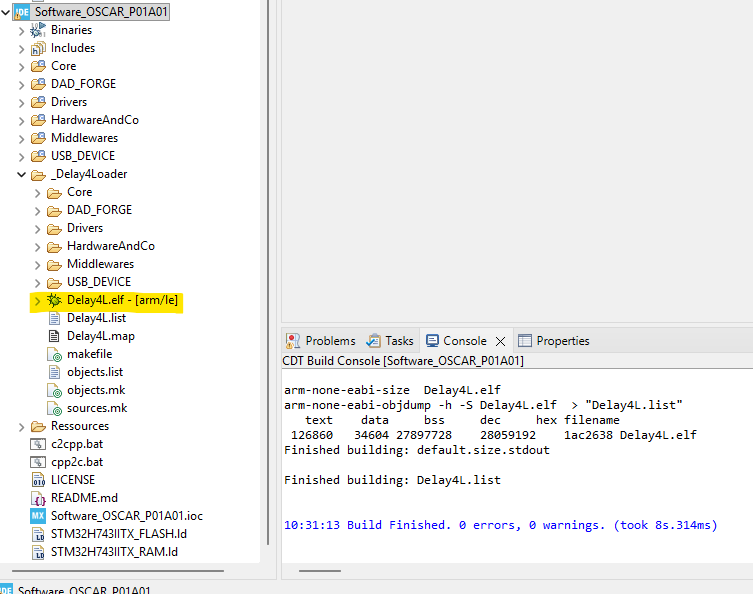
You can compile the other effects in the same manner using these build configurations:
_Modulations4Loader_Reverb4Loader
Tip: Understanding Build Configurations
- Use configurations starting with #xxx (e.g.,
#Delay) to generate standalone executables that are stored in the internal flash memory of the STM32H743.- Configurations ending with 4Loader (e.g.,
Delay4Loader) produce executables designed for storage in the board’s QSPI flash memory, which are then launched by the bootloader.- The Debug configuration is used to debug the software directly within the STM32CubeIDE environment.
- The Release configuration produces a standalone executable (similar to the
#xxxconfigurations). The final compiled effect version is determined by the contents of this file:Software_OSCAR_P01A01/DAD_FORGE/Effects/@Config/EffectsConfig.h.