How to Compile FlasherLoader
This tutorial explains how to compile the FlasherLoader utility.
About FlasherLoader The FlasherLoader serves two primary functions on the OSCAR P01 board:
- It is a flasher utility used to transfer resource files (images, fonts, ELF executables, samples, etc.) into the external QSPI flash memory.
- It acts as the bootloader, which allows the pedal to launch selected executables from the external QSPI flash memory upon power-up.
Prerequisites
You must have the following installed and configured:
- Git and STM32CubeIDE.
- The OSCAR_P01_FlasherLoader repository cloned, with the workspace properly configured in STM32CubeIDE.
See: How to Create Your Workspace
Compiling FlasherLoader
Follow these steps to compile FlasherLoader:
- Select the
OSCAR_P01_FlasherLoaderproject within STM32CubeIDE. - Build the project using the
Releaseconfiguration.
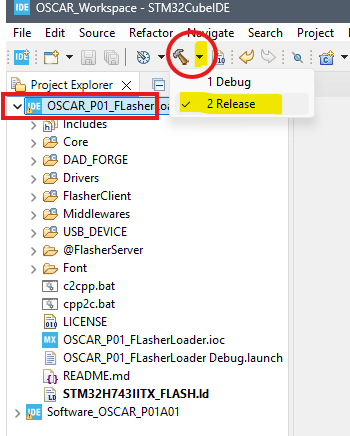
The compilation process will now begin.
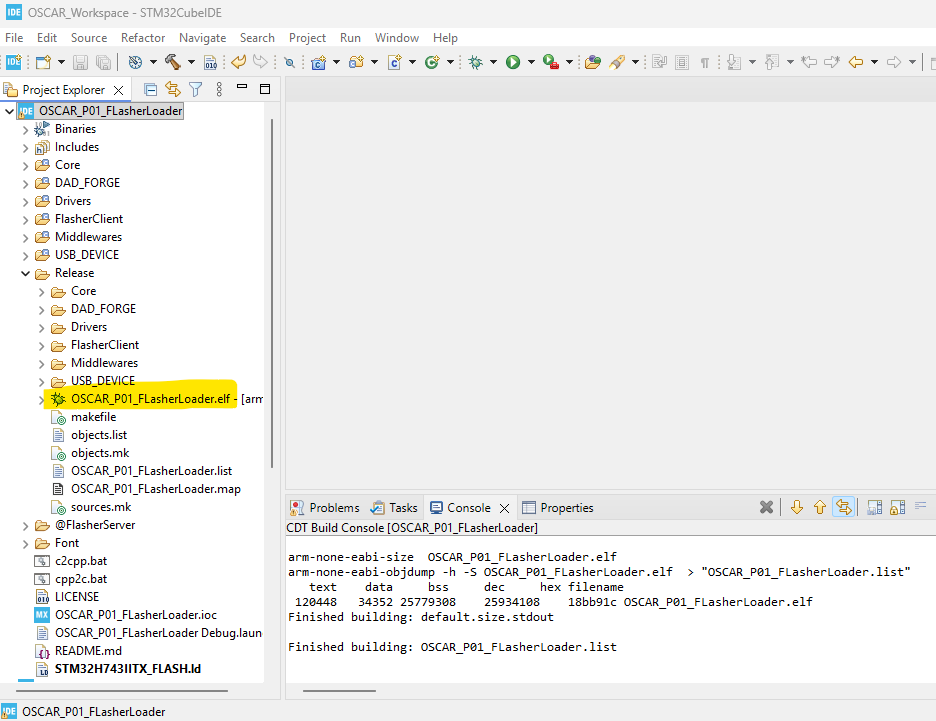
- If the compilation completes successfully, a directory named
Releaseshould appear inside your project structure. - This directory contains the generated executable file:
OSCAR_P01_FlasherLoader.elf.