How to Program OSCAR
This tutorial explains how to program the FlasherLoader or an audio effect onto the OSCAR hardware platform.
Prerequisites
You must have the following:
- STM32CubeProgrammer installed.
- A working OSCAR pedal (hardware platform) with a compatible 12V power supply, required for downloading and running the software.
- The software to be loaded already compiled: See tutorials: How to Compile Effects and How to Compile FlasherLoader.
- Optionally, an ST-Link programmer.
Programming OSCAR
To program the software into the STM32H743 internal memory, you can use one of two methods:
- An ST-Link programmer.
- The USB DFU protocol.
Programming Using DFU Mode (Without ST-Link)
Follow these steps to utilize DFU mode:
- Connect the OSCAR pedal to your computer using a USB cable.
- Power on OSCAR while keeping the BOOT button pressed. (This action puts the board into DFU mode.)
- Launch STM32CubeProgrammer.
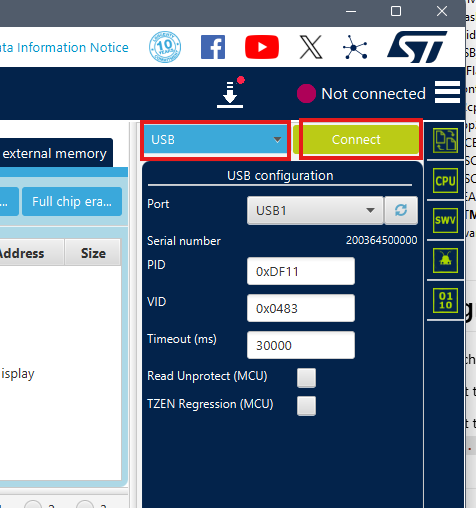
- In STM32CubeProgrammer:
- Select
USB. - Click
Connect.
- Select
Programming Using an ST-Link
If you are using an ST-Link programmer, follow these steps:
- Before powering the board, connect your ST-Link to OSCAR using the 4-pin debug connector with the following mapping:
- GND -> 0V
- SWDIO -> DIO
- SWCLK -> CLK
- Power on OSCAR.
- Launch STM32CubeProgrammer.
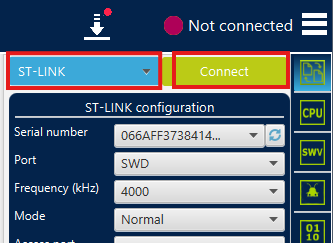
- In STM32CubeProgrammer:
- Select
ST-LINK. - Click
Connect.
- Select
Final Programming Steps (DFU or ST-Link)
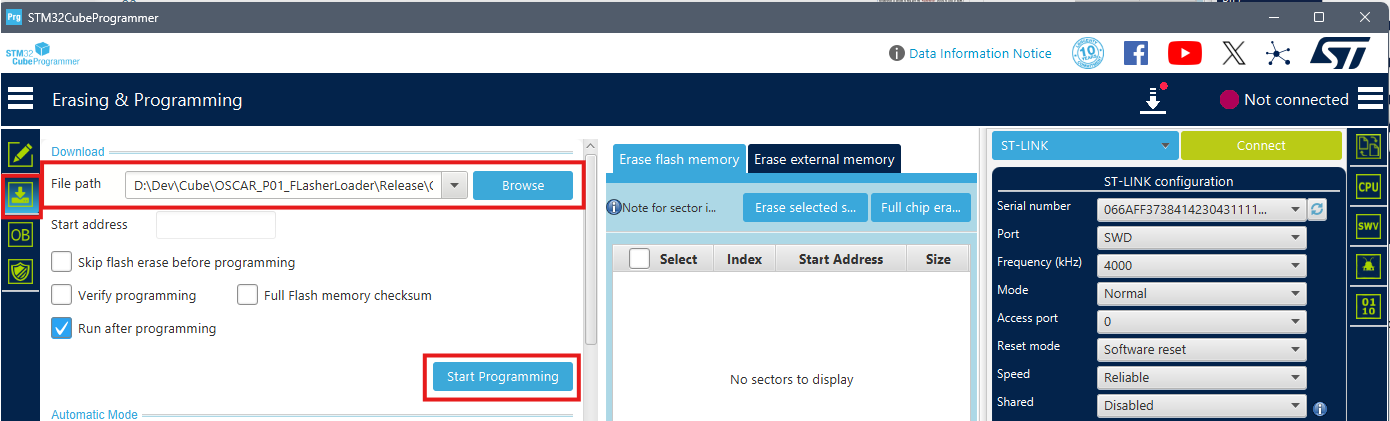
Once connected via either DFU or ST-Link, perform the final programming steps:
- Select the
Erasing & Programmingtab in STM32CubeProgrammer. - Select the ELF file you wish to program (e.g., FlasherLoader):
......\OSCAR_Workspace\OSCAR_P01_FlasherLoader\Release\OSCAR_P01_FlasherLoader.elf - Click
Start Programming.