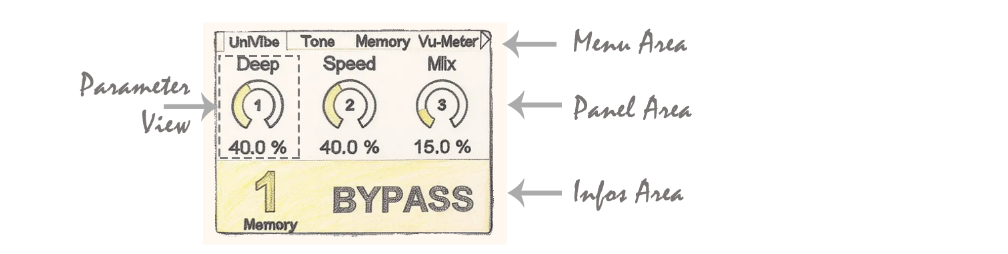
Namespace: DadGUI::cInfoView Files: cInfoView.h / cInfoView.cpp Directory: DAD_FORGE/GUI/Components/ Inheritance:DadGUI::iUIComponent Description: Provides a status area displaying the selected preset number, its modification status (dirty), and the system state (ON/OFF/BYPASS). Updates automatically.
📋 Class Description
The cInfoView class is a user interface (UI) component that monitors and visually displays system status in the Info Area. It manages the dynamic display of the selected preset number, the operating state (ON, OFF or BYPASS), and a visual modification indicator (“Dirty”). The component can handle bitmap backgrounds loaded from flash memory and dynamically adapts to the system’s active color palette.
🔗 External Dependencies
File Inclusions
Included File
Source
Role
"cDisplay.h"
DAD_FORGE/GUI/Components
Display manager.
"cFlasherStorage.h"
DAD_FORGE/Drivers
Flash storage access for loading background images.
External Functions Called
Signature
Source
Usage
bool sendEventToActive_SerializeIsDirty()
__GUI_EventManager
Checks if parameters have been modified (Dirty status).
Global Variables Used and Driver Objects
Variable / Object
Type
Source
Role
__Display
cDisplay*
extern
Main display and layer manager.
__FlasherStorage
cFlasherStorage
extern
Access to graphic resources stored in Flash.
__MemoryManager
cMemoryManager
extern
Retrieves the active memory slot.
__GUI_EventManager
cGUI_EventManager
extern
Notification of state changes (Dirty flag).
__MemOnOff
eOnOff
extern
Current memory state (ON/OFF/BYPASS).
__pActivePalette
cPalette*
extern
Retrieves user interface colors.
🎯 Associated Enumerations and Structures
No local enumerations or associated structures.
📚 Public Methods
Init
Element
Details
Method
void Init()
Description
Initializes internal members, creates the dedicated display layer, and loads background images from flash memory.
Return
void
Activate
Element
Details
Method
void Activate() override
Description
Activates the component, brings it to the foreground (Z-order), and initializes the display with the current memory state.
Return
void
Deactivate
Element
Details
Method
void Deactivate() override
Description
Deactivates the component and sends the display layer to the background.
Return
void
Update
Element
Details
Method
void Update() override
Description
Checks if the system state (slot, ON/OFF state, or Dirty status) has changed to refresh the display.
Return
void
Redraw
Element
Details
Method
void Redraw() override
Description
Forces a complete redraw of the component with the current system state.