How to mix Dry/Wet
This chapter details the Dry/Wet principles as implemented within the OSCAR ecosystem and demonstrates how to practically achieve a Dry/Wet mix.
The Foundation of Dry/Wet Signal Processing
The construction of any sound effect relies on the synergistic blending between the untreated source signal (Dry) and the effect-modified signal (Wet).
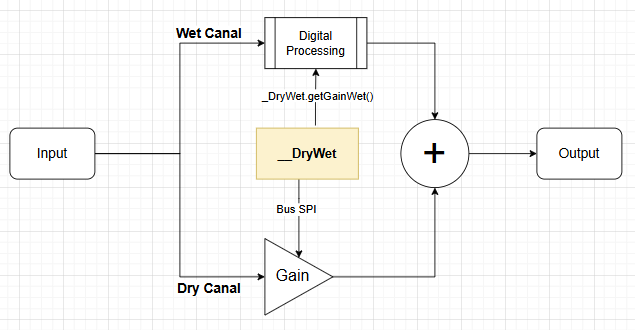
Within the OSCAR/PENDA architecture, this processing is entirely realized in analog to achieve optimal sonic quality. The Dry channel remains purely analog; it does not pass through the complete digital processing loop (Analog-to-Digital conversion (A/D), DSP processing, and Digital-to-Analog reconversion (D/A)).
This principle guarantees not only zero latency for the dry signal, but also ensures perfect sonic integrity.
Differences Between OSCAR and PENDA Hardware Platforms
The main difference between the OSCAR and PENDA hardware platforms lies in the management of the Dry signal.
-
On OSCAR, the Dry channel level is controlled by a digital potentiometer driven by the microcontroller over an SPI bus. This allows the software to automatically control the Dry/Wet mix.
-
On PENDA, the Dry channel level is adjusted using a physical analog potentiometer operated directly by the user. As a result, the software cannot modify the Dry level.
To account for this hardware difference, the HARD_DRYWET constant is defined whenever the Dry channel is controlled by a physical potentiometer. This constant allows effects to support both hardware architectures using conditional compilation. The effect behavior can therefore be adapted to the target platform without changing its core implementation :
- OSCAR: the Dry/Wet mix is fully managed by FORGE’s __DryWet object.
- PENDA: the Dry/Wet mix is adjusted manually by the user using the Dry and Wet potentiometers.
Even on PENDA, it is recommended to use the __DryWet object. Although it does not control the Dry signal level, it still provides several useful features, including:
- muting the effect when it is bypassed,
- smooth Fade-Out and Fade-In transitions during preset changes,
- and other signal management features shared across both hardware platforms.
__DryWet object
The gain of the dry channel (the untreated original signal) is adjusted using an electronic potentiometer.
To simplify usage, this technical aspect is entirely managed by the global object __DryWet. This object controls the digital potentiometer and automatically calculates the wet gain in a transparent manner, hiding all the complexity involved in maintaining a consistent psychoacoustic level between the dry and wet signals..
The code OSCAR
We are going to change the behavior of the m_DelayMix parameter.
First, we add a callback to intercept any changes to this parameter.
In cMyFirstEffect.h
Add the callback declaration:
    // -------------------------------------------------------------------------
    // Mix callback
    // -------------------------------------------------------------------------
    void static onMixChange(DadDSP::cParameter* pMixParameter, uint32_t Data);
In cMyFirstEffect.cpp
In the onInitialize() methode, update the initialization of the m_DelayMix parameter to include the callback:
    // Initialize the Mix parameter
    m_DelayMix.Init(MY_FIRST_EFFECT_ID,     // Serialize ID
                         50.0f,             // Default value
                         0.0f,              // Minimum value
                         100.0f,            // Maximum value
                         10.0f,             // Fast increment
                         1.0f,              // Slow increment
                         onMixChange,       // Callback function
                         (uint32_t)this,    // Callback user data
                         1.0f,              // Transition time (seconds)
                         25);               // MIDI CC number
At the end of the file, implement the callback. It updates the Dry/Wet mix ratio using the global __DryWet object:
// -------------------------------------------------------------------------
// Mix callback
// -------------------------------------------------------------------------
void cMyFirstEffect::onMixChange(DadDSP::cParameter* pMixParameter, uint32_t Data){
    __DryWet.setMix(pMixParameter->getValue());
}
In the onProcess() function, replace the previous mixing code with the following: We ask the __DryWet object for the gain to apply to the Wet channel.
The Dry channel is no longer processed manually, __DryWet now fully handles the mixing.
The factor 1.25f compensates for the gain reduction introduced by the feedback loop. The feedback is calculated as: m_DelayFeedback.getValue() * 0.008f, which represents an attenuation to 0.8% of full scale. To maintain consistent overall loudness and prevent a noticeable loss of level on the Wet signal, we apply a compensatory gain of 1.25 (equivalent to +1.94 dB)
// Apply wet gain to the outputs. The 1.25f factor compensates for the minimum
// feedback attenuation (0.008f)
float GainWet = __DryWet.getGainWet();
pOut->Left  = DelayLeftOut * GainWet  * m_LeftGain * 1.25f;
pOut->Right = DelayRightOut * GainWet * m_RightGain * 1.25f;
Adapting the Code for PENDA Compatibility
In this tutorial, we will not further optimize the code specifically for the PENDA platform. Our goal is simply to make the minimum changes required to ensure compatibility. Some parts of the code become unnecessary on PENDA, but they are intentionally left unchanged to minimize the differences between the OSCAR and PENDA implementations. These unused sections have no impact on the effect’s behavior.
PENDA Operation
On PENDA, the Dry and Wet signal levels are adjusted manually by the user using two physical potentiometers.
Therefore, the __DryWet object should be configured for a 100% Wet mix, and this mix should no longer be modified by the effect.
When the pedal is switched Off, __DryWet gradually reduces the gain returned by __DryWet.getGainWet() down to 0.0f, creating a smooth Fade-Out of the processed signal.
When the pedal is switched On, __DryWet gradually increases the gain returned by __DryWet.getGainWet() up to 1.0f, creating a smooth Fade-In of the processed signal.
The same mechanism is also used during preset changes to provide seamless transitions between presets.
If this behavior does not suit your effect or is incompatible with its design, you can simply avoid using the __DryWet object and manage the Wet signal gain manually.
PENDA code
To make the effect compatible with both PENDA and OSCAR, we will use the HARD_DRYWET compile-time constant.
Update cMyFirstEffect.cpp
Remove the Mix parameter from the user interface::
In onInitialize(), remove the Mix parameter from the parameter panel when compiling for PENDA, since the Dry/Wet balance is adjusted manually by the user.
#ifndef HARD_DRYWET
    m_DelayPanel.Init(    &m_DelayTimeView,             // Parameter View 1
                          &m_DelayFeedbackView,         // Parameter View 2
                          &m_DelayMixView);             // Parameter View 3
#else
    m_DelayPanel.Init(    &m_DelayTimeView,             // Parameter View 1
                          nullptr,
                          &m_DelayFeedbackView);        // Parameter View 3
#endif
Force the Dry/Wet mix to 100% Wet
At the end of onInitialize(), configure __DryWet for a 100% Wet mix.
#ifdef HARD_DRYWET
__DryWet.setMix(100.0);
#endif
Disable the Mix callback
Finally, prevent the Mix callback from updating the __DryWet mix. The callback is still invoked during parameter initialization, so it must be disabled when compiling for PENDA.
// -------------------------------------------------------------------------
// Mix callback
// -------------------------------------------------------------------------
void cMyFirstEffect::onMixChange(DadDSP::cParameter* pMixParameter, uint32_t Data){
#ifndef HARD_DRYWET
    __DryWet.setMix(pMixParameter->getValue());
#endif
}
After these changes, the same source code can be compiled for both OSCAR and PENDA. On OSCAR, the software controls the Dry/Wet mix. On PENDA, the user controls the mix with the physical potentiometers, while __DryWet continues to handle mute and smooth transitions during pedal state and preset changes.