Themes
Presentation
The Themes module provides all the components required to define the colors of the various graphical elements used by the FORGE user interface.
The customizable interface elements and their associated colors are defined in the sColorPalette structure.
The __ColorPalette[NB_PALETTE] array contains all the color palettes (themes) available in the application.
FORGE provides a set of predefined themes by default. However, users can easily create and use their own themes by defining a custom UserPalette.h configuration file.
Palette Builder
To simplify theme creation, FORGE includes a Python utility named ColorConfigurator.py, located in:
DAD_FORGE/@Python Utilities/PaletteBuilder
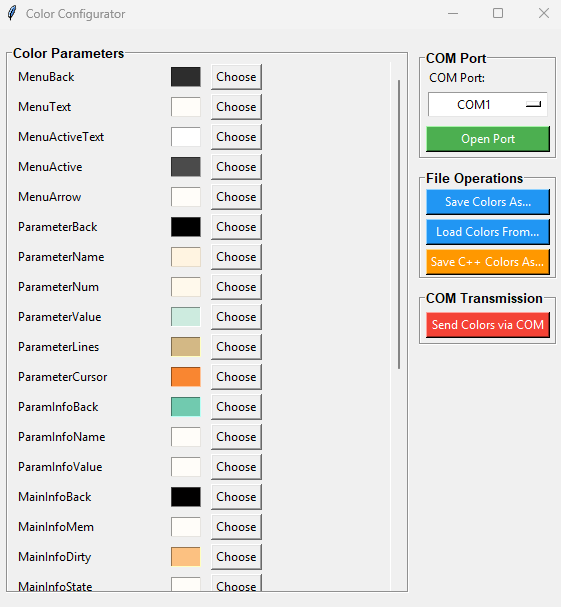
Before using this utility, the USB interface must be configured in COM mode by editing the file:
@Config/Inc/Options.h
//#define USB_DEVICE    DEVICE_MIDI
#define USB_DEVICE      DEVICE_COM
Then follow these steps:
- Connect the OSCAR or PENDA board to the PC using the USB cable.
- Power on the board.
- Launch
ColorConfigurator.py. - Select the appropriate COM port and click Connect.
- Load an existing theme by clicking Load Colors From.
- Modify the colors using the graphical interface.
- Click Send Colors Via to immediately transfer the new palette to the hardware. The user interface colors are updated in real time.
- Save the modified theme by clicking Save Colors As.
- Generate a C++ header file by clicking Save C++ Colors As.
The generated .hpp file contains a fully initialized sColorPalette structure describing the new theme.
This file can then be included from the user configuration file UserPalette.h to make the new theme available to FORGE.
Example:
#define NB_PALETTE 8

// Array of color palettes available in the system
sColorPalette __ColorPalette[NB_PALETTE] =
{
#include "MixBlue.hpp"
,
#include "BlueGreen.hpp"
,
#include "Ambre2.hpp"
,
#include "Blue.hpp"
,
#include "Ambre.hpp"
,
#include "Yellow.hpp"
,
#include "Purple.hpp"
,
#include "PaleBlue.hpp"
};
Themes Manager
The cThemesManager class manages the currently selected theme.
It is responsible for:
- storing the active color palette;
- applying the selected palette to the graphical interface;
- notifying all registered objects whenever the current theme changes.
Any class that needs to react to a theme change can register with cThemesManager. When a new theme is selected, the manager automatically informs all registered clients so they can update their appearance using the new color palette.