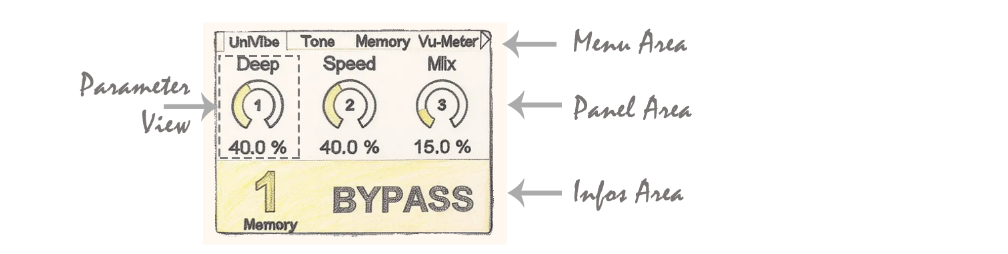
Namespace: DadGUI::cMainGUI Files: MainGUI.h / MainGUI.cpp Directory: DAD_FORGE/GUI/Core/ Inheritance: N/A Description: Main graphical user interface (GUI) controller managing components, event handling, fonts, and global system operations.
📋 Class Description
The cMainGUI class acts as the conductor of the user interface. It is responsible for initializing the graphics system (loading fonts from flash memory, initializing themes), managing the lifecycle of components (main component and background component), and broadcasting events (parameter changes, restore operations). It also contains the main loop (MainLoop) which orchestrates graphic updates and performance monitoring.
🏗️ Display Architecture: Main vs Background Components
The graphical interface is organized into superimposed layers that separate user interaction from system information display. This distinction is ensured by the cMainGUI controller through two types of components, each responsible for a specific screen area.
1. The Main Component
The Main Component manages the Menu Area (navigation tabs at the top) and the Panel Area (central parameters area). In the OSCAR system, activeMainComponent() is used to activate a Menu. This Menu then handles the display logic: depending on the tab selected by the user, it instantiates and activates the appropriate UI component in the Panel Area (parameter adjustment view with encoders and numeric values, preset selection view, configuration menu, etc.). The Main Component layer therefore has two levels:
cMainGUI manages which Menu is active. The active Menu manages which UI component is displayed in the Panel Area.
When activeMainComponent() is called, the old component is deactivated (Deactivate()), the new one is activated (Activate()) and immediately takes control of the display.
2. The Background Component
The Background Component is dedicated to the Info Area (the bar at the bottom of the screen). Its role is to permanently display critical status information, regardless of the ongoing interaction in the main layer. It displays data that must remain visible under all circumstances: the operating mode (BYPASS, ON, OFF), the number and name of the active preset (Memory).
🔗 External Dependencies
File Inclusions
Included File
Source
Role
"cPaletteBuilder.h"
DAD_FORGE/GUI/Themes
Color palette management
"cThemesManager.h"
DAD_FORGE/GUI/Themes
Theme management
"cMemoryManager.h"
DAD_FORGE/Core
System memory management
"cDisplay.h"
DadGFX
Display driver
"cFlasherStorage.h"
DadPersistentStorage
Flash memory access
"iUIComponent.h"
DAD_FORGE/GUI/Core
Base UI component interface
Global Variables
Variable / Object
Type
Source
Role
__ThemesManager
cThemesManager
extern
Theme manager
__GUI_EventManager
GUI_EventManager
extern
GUI event manager
__MemoryManager
cMemoryManager
extern
Global memory manager
__Display
DadGFX::cDisplay
extern
Main display driver
__FlasherStorage
cFlasherStorage
extern
Flash storage access
External Functions Called
Function
Source
Usage
TogglePIN(LED)
GPIO.h
Toggles LED state for activity indication
📚 Public Methods
cMainGUI
Element
Details
Method
cMainGUI()
Description
Default constructor.
~cMainGUI
Element
Details
Method
virtual ~cMainGUI()
Description
Virtual destructor.
Initialize
Element
Details
Method
void Initialize()
Description
Prepares the GUI system by loading fonts from flash memory, initializes themes, and resets event managers.